ELT Pipeline with Airflow, dbt, and PostgreSQL
ELT data pipeline.
Year
2026
Type of Project
Side Project
My Role
Data Engineer
Case Study
Objective
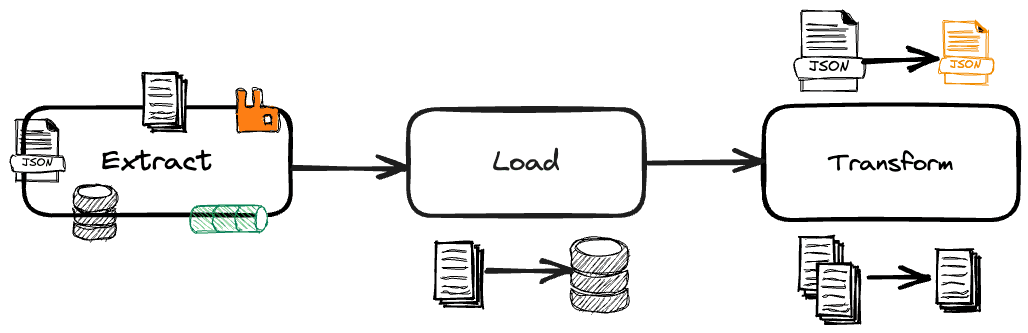
A fully containerized Extract-Load-Transform (ELT) data pipeline that moves data from a source PostgreSQL database to a destination database using Apache Airflow for orchestration and dbt for data transformations.
Architecture
Source PostgreSQL (main_db)
|
| pg_dump + psql (ELT Script)
v
Destination PostgreSQL (des_db)
|
| dbt run --full-refresh
v
Transformed Tables (films, actors, film_actors, film_ratings, specific_movie)
Process
How it works
Extract & Load: A Python script uses pg_dump to dump the source database and psql to load it into the destination database.
Transform: dbt connects to the destination database and builds models to create clean, analytics-ready tables with added business logic.
Orchestration: Apache Airflow runs both steps in sequence as a DAG, making sure the ELT finishes before dbt starts. The dbt step runs in a separate Docker container using Airflow’s DockerOperator.
Outcome
Challenges Faced and Solutions
dbt config-version error
Problem: dbt refused to start with Invalid config version: 1, expected 2.Solution: Added config-version: 2 to dbt_project.yml. Modern versions of dbt (1.0+) require this field.
Race condition between ELT and dbt
Problem: When running the ELT script and dbt as separate Docker Compose services, dbt started before the ELT script finished loading data. Docker Compose depends_on only waits for a container to start, not to complete.
Solution: Used depends_on with condition: service_completed_successfully (requires the modern Compose Specification, so the deprecated version: '3' key was removed from docker-compose.yaml). Later, Airflow replaced this entirely by enforcing task ordering with t1 >> t2.
dbt profiles pointing to wrong host
Problem: The dbt profiles.yml used host: host.docker.internal with port 5434 (the host-mapped port), routing traffic through the host machine unnecessarily.
Solution: Changed to host: des_postgres and port: 5432 to use the internal Docker network directly.
Airflow password mismatch
Problem: The Airflow metadata PostgreSQL was configured with POSTGRES_PASSWORD=ujjwal, but the connection strings in the Airflow services used airflow as the password.
Solution: Updated all SQL_ALCHEMY_CONN connection strings to use the correct password (ujjwal).
Airflow 3.x breaking changes
Problem: Using apache/airflow:latest pulled Airflow 3.x, which removed the webserver command (replaced with api-server), removed db init (replaced with db migrate), and deprecated the postgres+psycopg2connection scheme.
Solution: Pinned the Airflow image to apache/airflow:2.10.4 in both the Dockerfile and docker-compose.yaml, and fixed the connection string scheme to postgresql+psycopg2.
Corrupted PostgreSQL data directory
Problem: Repeated ungraceful shutdowns corrupted the source PostgreSQL volume, causing an infinite crash loop (could not open file "global/pg_filenode.map").
Solution: Ran docker compose down -v to remove the anonymous volumes, allowing PostgreSQL to reinitialize from the init.sql script on the next start.
Port conflicts
Problem: Both the webserver and scheduler were mapped to the same host port, and previously used ports remained allocated.
Solution: Removed the port mapping from the scheduler (it doesn't need one) and used lsof -ti :PORT | xargs kill -9 to free occupied ports.
Airflow DB not initialized before webserver starts
Problem: The webserver and init-airflow both depended on postgres, so they started simultaneously. The webserver crashed because the database wasn't initialized yet.
Solution: Changed webserver and scheduler depends_on to wait for init-airflow with condition: service_completed_successfully.
Python 3 syntax error in DAG
Problem: datetime(2026, 01, 29) caused a SyntaxError because Python 3 does not allow leading zeros in integer literals.
Solution: Changed to datetime(2026, 1, 29).
Wrong ELT script path in DAG
Problem: The DAG referenced /opt/airflow/elt_script/elt_script.py, but the volume mount maps ./eltto /opt/airflow/elt.
Solution: Updated the path to /opt/airflow/elt/elt_script.py.
PostgreSQL version mismatch
Problem: The source PostgreSQL was postgres:latest (v18), but the pg_dump client inside the Airflow container was v17. pg_dump refuses to dump from a server newer than itself.
Solution: Pinned both PostgreSQL containers to postgres:17 to match the client version.
DockerOperator mount paths and network
Problem: The DockerOperator in the DAG had hardcoded mount paths from another developer's machine (/Users/justinchau/...) and used network_mode="bridge", which prevented the dbt container from resolving des_postgres.
Solution: Updated mount paths to the correct local paths and changed network_mode to elt_elt_network (the actual Compose network name).
Standout Features
Apache Airflow 2.10.4 - Workflow orchestration
PostgreSQL 17 - Source and destination databases
dbt 1.4.7 - Data transformation
Docker & Docker Compose - Containerization
Python 3.12 - Airflow runtime and ELT scripting